 oks-ui
Omkar Sahu · 8 min read
Published · Updated · Last reviewed · by Omkar Sahu
The classic dark-mode bug: a visitor who chose dark loads your page, and for a moment it is light, then it snaps to dark. The fix is small, but it only works if the theme is applied in a particular order, and most "add a class in useEffect" versions get that order wrong. This is the pattern this site runs on, with what I measured when I tried to break it.
Server-rendered HTML cannot know a returning visitor's choice. It lives in the browser's localStorage, which the server cannot read, so the page ships with a default theme. If the real theme is applied later, by a script that arrives with your app or by a React effect, the browser has already painted the default.
To see it, I built two tiny pages. Both have a stored choice of dark and a light system setting. In the first, the theme is applied by a script that loads 1.5 seconds after the page appears, standing in for your app bundle. In the second, a synchronous script in the head applies it.
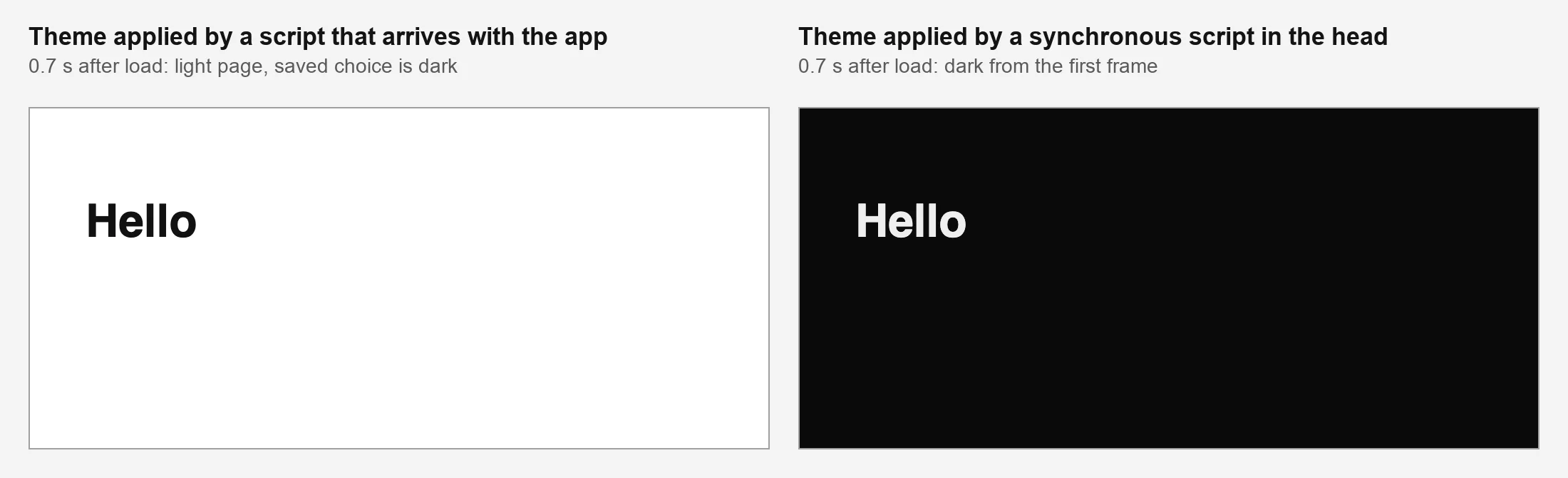
The same page 0.7 seconds after load. Left: the theme is applied by a later script. Right: a synchronous script in the head.
I recorded the background colour of every animation frame from the start of the page. With the later script, 81 to 91 frames in every browser were light, which is the 1.5 second gap I built in. With the synchronous script, no frame was light in any browser. On a fast connection the real gap is much shorter, but it is the same gap.
The theme has to be on the page before the first paint, which means before your JavaScript loads. A small synchronous <script> in <head> does that:
(function () {
  var stored = null;
  var dark = false;
  try { stored = localStorage.getItem("oks-ui-theme"); } catch (e) {}
  try { dark = window.matchMedia("(prefers-color-scheme: dark)").matches; } catch (e) {}
  var theme = stored === "light" || stored === "dark" ? stored : dark ? "dark" : "light";
  document.documentElement.setAttribute("data-theme", theme);
})();
This is not the version the first post showed. It differs in one way, explained in the third detail below.
The first version said that in Next.js this is <Script strategy="beforeInteractive">. On this site that was wrong. Our site is a static export, and in the exported HTML that script is not an inline script at all. It is a line that queues the code to run once the framework's JavaScript has loaded, which is after the first paint. The page I had described as protected was not.
I found it by loading the live site 12 times in each browser with a light system setting and a stored choice of dark. A light frame appeared in 12 of 12 runs in Chromium, 12 of 12 in Firefox and 11 of 12 in WebKit, usually one or two frames. Visitors whose system was dark never saw it, because the stylesheet has a separate dark rule for the system setting that covers the gap. So the flash only hit people whose saved choice differs from their system, and I would not have noticed it by eye.
The fix was to replace the framework's script with a plain inline <script> in the head. After that change, on a local build, no light frame appeared in any of the 12 runs in any browser.
beforeInteractive runs before the first paint. Check the HTML you actually ship. If the script is not inline in the head, use a plain <script> tag.Placement relative to the stylesheet turned out not to matter. The first post said the script must come before the stylesheet. I tested it after the stylesheet as well, and there was no light frame in any browser. What matters is that it is synchronous and runs before the first paint.
The script reads the stored choice, then the system setting, then falls back to light. I tested a version without the system setting. A first-time visitor with a dark system got a light page in all three browsers, so that claim holds. If your CSS has its own rule for the system setting, as this site does, it can hide that mistake, so test with a stored choice that differs from the system.
The first post said an uncaught error from localStorage in a script this early "can block the rest of the page from rendering at all". I made localStorage.getItem throw, as it can in some privacy settings. The page still rendered in all three browsers. The error is logged, the script stops, and no theme is set.
So the real risk is smaller, and different. Wrapping the whole script in one try stops the error, but it also skips the system-setting check, so a visitor with a dark system and blocked storage gets the light default. Reading storage and the system setting in separate try blocks, as in the script above, gave them a dark page in all three browsers.
The script sets data-theme on <html>, outside React's tree. React's hydration then finds an attribute the server did not render. I tested this with React 19.3 in development mode in all three browsers. Without suppressHydrationWarning on <html>, React logged "A tree hydrated but some attributes of the server rendered HTML didn't match". With it, there was no warning, and the theme stayed dark after hydration.
<html lang="en" suppressHydrationWarning>
  {/* ... */}
</html>Once data-theme="dark" is on <html>, the tokens respond to an ordinary attribute selector, with no context and no provider:
:root { --oks-color-surface: #fff; }
:root[data-theme="dark"] { --oks-color-surface: #0a0a0a; }
A toggle only has to flip the attribute and write the same key to localStorage. The init script does not need to run again. The tokens are listed on the Dark mode page.
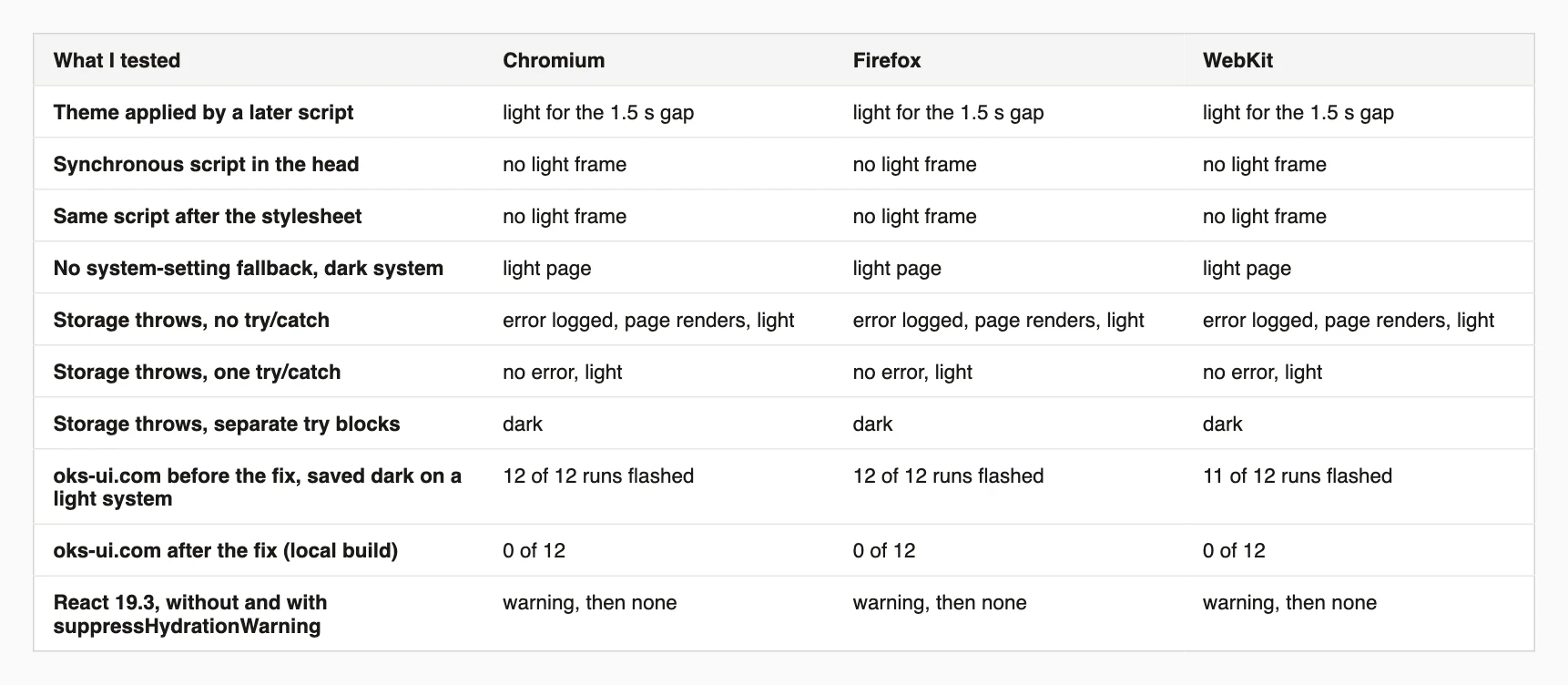
Every result, in all three browsers.
This script loads a page with a light system setting and a saved choice of dark, and counts the light frames in each browser. Put your own storage key as the second argument if it is not oks-ui-theme. Install playwright and its browsers first.
// node first-paint-check.mjs http://localhost:3000/ [storageKey]
import { chromium, firefox, webkit } from "playwright";

const url = process.argv[2];
const key = process.argv[3] ?? "oks-ui-theme";
// Runs before any page script: remember the background colour of every frame.
const recorder = `(() => {
  window.__frames = [];
  const start = performance.now();
  const tick = () => {
    const el = document.body || document.documentElement;
    window.__frames.push(getComputedStyle(el).backgroundColor);
    if (performance.now() - start < 2000) requestAnimationFrame(tick);
  };
  requestAnimationFrame(tick);
})();`;
const isLight = (rgb) => {
  const [r, g, b] = rgb.match(/\d+/g).map(Number);
  return rgb !== "rgba(0, 0, 0, 0)" && (r + g + b) / 3 > 128;
};

for (const [name, type] of [["Chromium", chromium], ["Firefox", firefox], ["WebKit", webkit]]) {
  const browser = await type.launch();
  // A visitor whose system is light but who chose dark on a previous visit.
  const context = await browser.newContext({ colorScheme: "light" });
  const page = await context.newPage();
  await page.addInitScript(([k]) => localStorage.setItem(k, "dark"), [key]);
  await page.addInitScript(recorder);
  await page.goto(url, { waitUntil: "commit" });
  await page.waitForTimeout(2300);
  const frames = await page.evaluate(() => window.__frames);
  const light = frames.filter(isLight).length;
  console.log(`${name}: ${frames.length} frames, ${light} light${light ? "  <- flash" : ""}`);
  await browser.close();
}
On my two test pages it printed 91 light for the later script and 0 light for the synchronous one in Chromium, with similar counts in Firefox and WebKit.
beforeInteractive on a server-rendered Next.js app.suppressHydrationWarning scope advice is untested, as noted above.I'm a front-end engineer based in Hyderabad, India, with more than 17 years of professional experience. I spent 12 years as a senior front-end developer, designing and building websites, and I have worked as a full-stack developer since 2022. I created oks-ui, a React component library with no runtime dependencies, and I write and maintain this site.