 oks-ui
Omkar Sahu · 7 min read
Published · Updated · Last reviewed · by Omkar Sahu

A component library should cost you only the components you use. We wanted to know whether oks-ui does, so we measured it: the published package, two bundlers, three versions. The answer was not what this post used to say.
import { Button } from "oks-ui" and from "oks-ui/button" give the same bundle in esbuild and in Rollup.Everything below was measured on the published npm package, not on the source:
For a Button alone, the two import styles gave files within two bytes of each other. For Button, Modal and Table together they were identical.
| What you import (oks-ui 1.4.1, esbuild) | Minified (KB) | Gzip (KB) |
| Button, from oks-ui/button | 14.5 | 5.7 |
| Button, from oks-ui | 14.5 | 5.7 |
| Button, Modal and Table, from their own paths | 151.5 | 41.3 |
| Button, Modal and Table, from oks-ui | 151.5 | 41.3 |
| The whole library (import * as ui) | 535.2 | 164.6 |
Rollup, through Vite's library mode, gave different absolute sizes (253.5 KB minified and 51.5 KB gzipped for the three components), but again the two import styles matched to within about a hundred bytes of gzip.
This works because the package declares that only its CSS files and one styles file have side effects (the sideEffects field in its package.json). A bundler is then free to drop every export you do not use.
The library itself has grown. The whole library, minified, by version:
| oks-ui version | Minified (KB) | Gzip (KB) |
| 1.2.2 | 409.2 | 121.5 |
| 1.3.2 | 409.3 | 121.7 |
| 1.4.1 | 535.2 | 164.6 |
That is about 31 percent more JavaScript between 1.3.2 and 1.4.1, as TreeView, Rating and a much larger TextEditor arrived. The cost of a Button did not change in any of the three versions.
The earlier version of this post gave "around 770 KB" for the whole library. We could not reproduce that number in any version. The closest figures are 409 KB in 1.2.2 and 535 KB today.
oks-ui/styles.css is not a stylesheet of its own. It is three imports: tokens (30.3 KB), utilities (29.8 KB) and components (362.7 KB). Together that is 422.7 KB raw, 56.2 KB gzipped, or 42.7 KB with Brotli, whether you use one component or all 38.
Each component also has its own stylesheet. These are not slices of the big one: a component's sheet includes the styles of the components it is built from. Button's sheet starts with the Tooltip's rules, and the sheets for Table, Chart, TextEditor and Rating each repeat Button's rules. Add all 38 per-component sheets together and you get 1.28 MB raw, about 3.5 times the single components sheet.
So the saving depends on what you use. Here is the CSS for a growing set of common components, each row with tokens.css and utilities.css included (about 60 KB raw and 7.7 KB gzipped together; utilities are optional):
| Components used | Added | Raw (KB) | Gzip (KB) |
| 1 | Button | 80.3 | 11.7 |
| 2 | Alert | 86.9 | 12.5 |
| 3 | Badge | 95.0 | 13.3 |
| 5 | Avatar, Modal | 127.2 | 16.3 |
| 8 | Tabs, Tooltip, Dropdown | 154.4 | 18.4 |
| 10 | Table, Toast | 330.9 | 38.3 |
| 12 | Progress, Accordion | 337.3 | 39.2 |
| 15 | Drawer, Pagination, Breadcrumbs | 357.7 | 41.4 |
| 19 | Card, FormFieldSet, Chip, Loader | 534.5 | 60.1 |
| All 38, through styles.css | 422.7 | 56.2 |
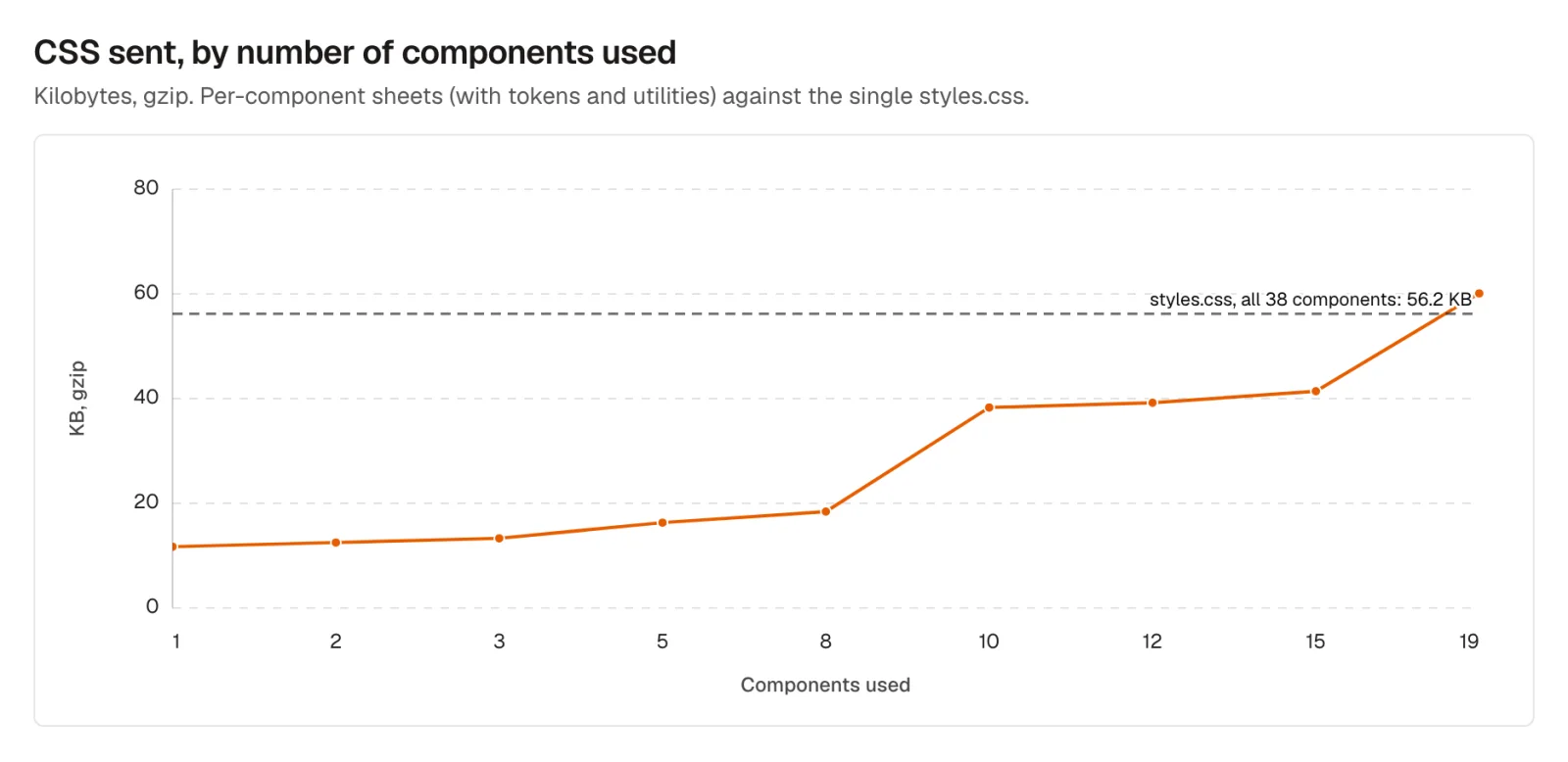
CSS gzipped, by number of components used, against the single styles.css (dashed). Measured on oks-ui 1.4.1.
The jump at ten components is Table: its sheet alone is 167 KB raw. The line crosses the single sheet at nineteen, after FormFieldSet joins. The sizes of the individual sheets explain the shape:
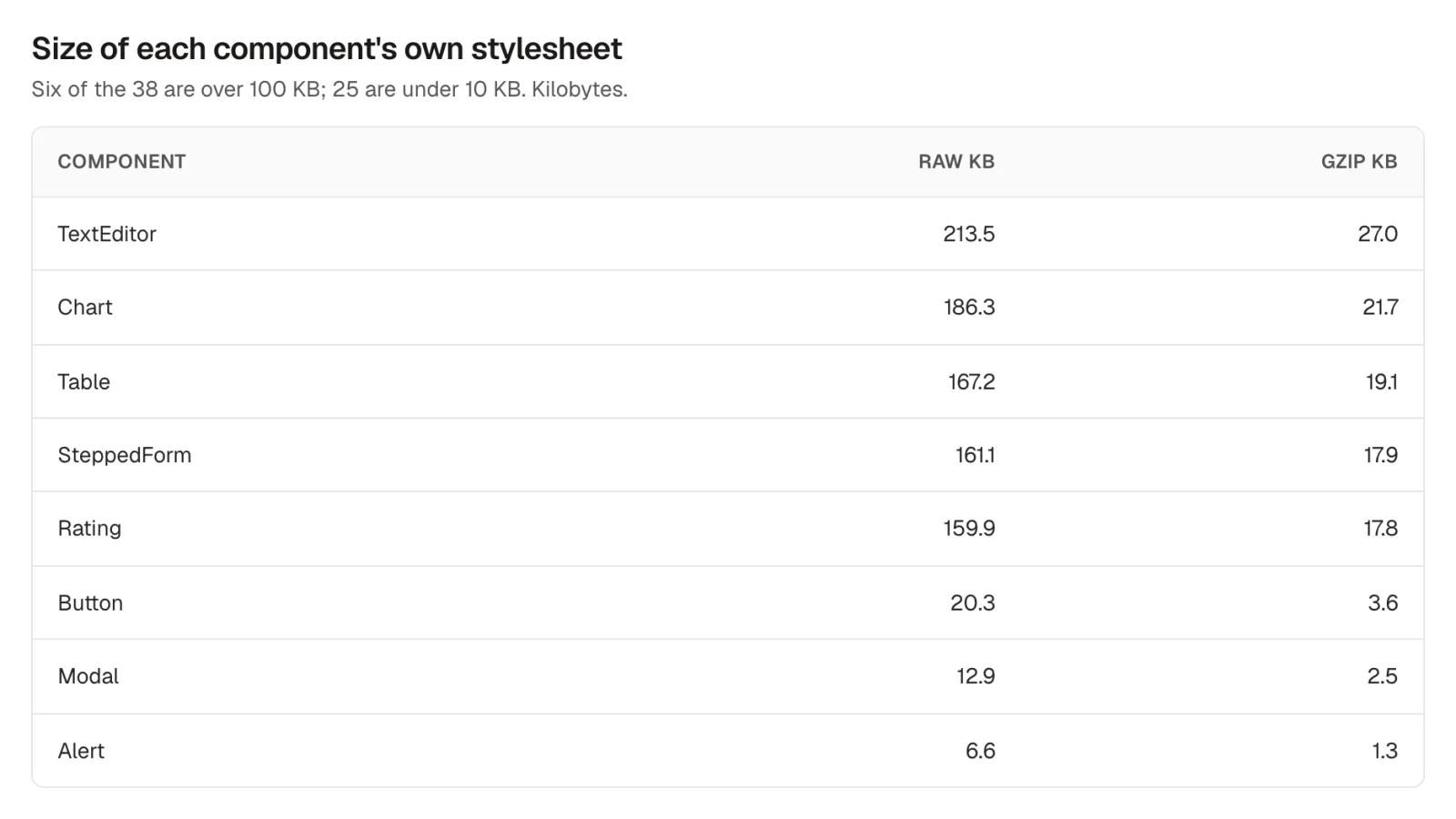
The five largest per-component stylesheets, then three small ones. Sizes in kilobytes.
Twenty-five of the 38 sheets are under 10 KB. Six are over 100 KB: FormFieldSet, Rating, SteppedForm, Table, Chart and TextEditor.
oks-ui and oks-ui/button cost the same.The script below measures the JavaScript for whatever imports you put in it. Run it with node in a project that has oks-ui and esbuild installed.
import { build } from "esbuild";
import { gzipSync } from "node:zlib";

const cases = {
  "Button, own path": `import { Button } from "oks-ui/button"; console.log(Button);`,
  "Button, main entry": `import { Button } from "oks-ui"; console.log(Button);`,
};

for (const [name, code] of Object.entries(cases)) {
  const result = await build({
    stdin: { contents: code, resolveDir: process.cwd(), loader: "js" },
    bundle: true,
    minify: true,
    write: false,
    format: "esm",
    external: ["react", "react-dom", "react/jsx-runtime"],
    loader: { ".css": "empty" },
    logLevel: "silent",
  });
  const bytes = result.outputFiles[0].contents;
  console.log(name.padEnd(22), bytes.length, "bytes,", gzipSync(bytes, { level: 9 }).length, "gzip");
}
For CSS, join the .css files you import from node_modules/oks-ui/dist and gzip them together, or read the size of the CSS in your build output. See both import styles in the installation guide.
I'm a front-end engineer based in Hyderabad, India, with more than 17 years of professional experience. I spent 12 years as a senior front-end developer, designing and building websites, and I have worked as a full-stack developer since 2022. I created oks-ui, a React component library with no runtime dependencies, and I write and maintain this site.