 oks-ui
Omkar Sahu · 9 min read
Published · Updated · Last reviewed · by Omkar Sahu

Search, sort, select, paginate: almost every admin screen needs the same data table, and almost every team ends up hand-rolling it because no single component quite covers all four. Here is the whole thing with Table, Pagination and FormFieldSet, wired together with plain React state.
import "oks-ui/tokens.css"; // the design tokens every component stylesheet reads
import { useMemo, useState } from "react";
import { Table, type TableSortDescriptor } from "oks-ui/table";
import "oks-ui/table.css";
import { Pagination, PaginationSummary } from "oks-ui/pagination";
import "oks-ui/pagination.css";
import { FormFieldSet } from "oks-ui/form-field-set";
import "oks-ui/form-field-set.css";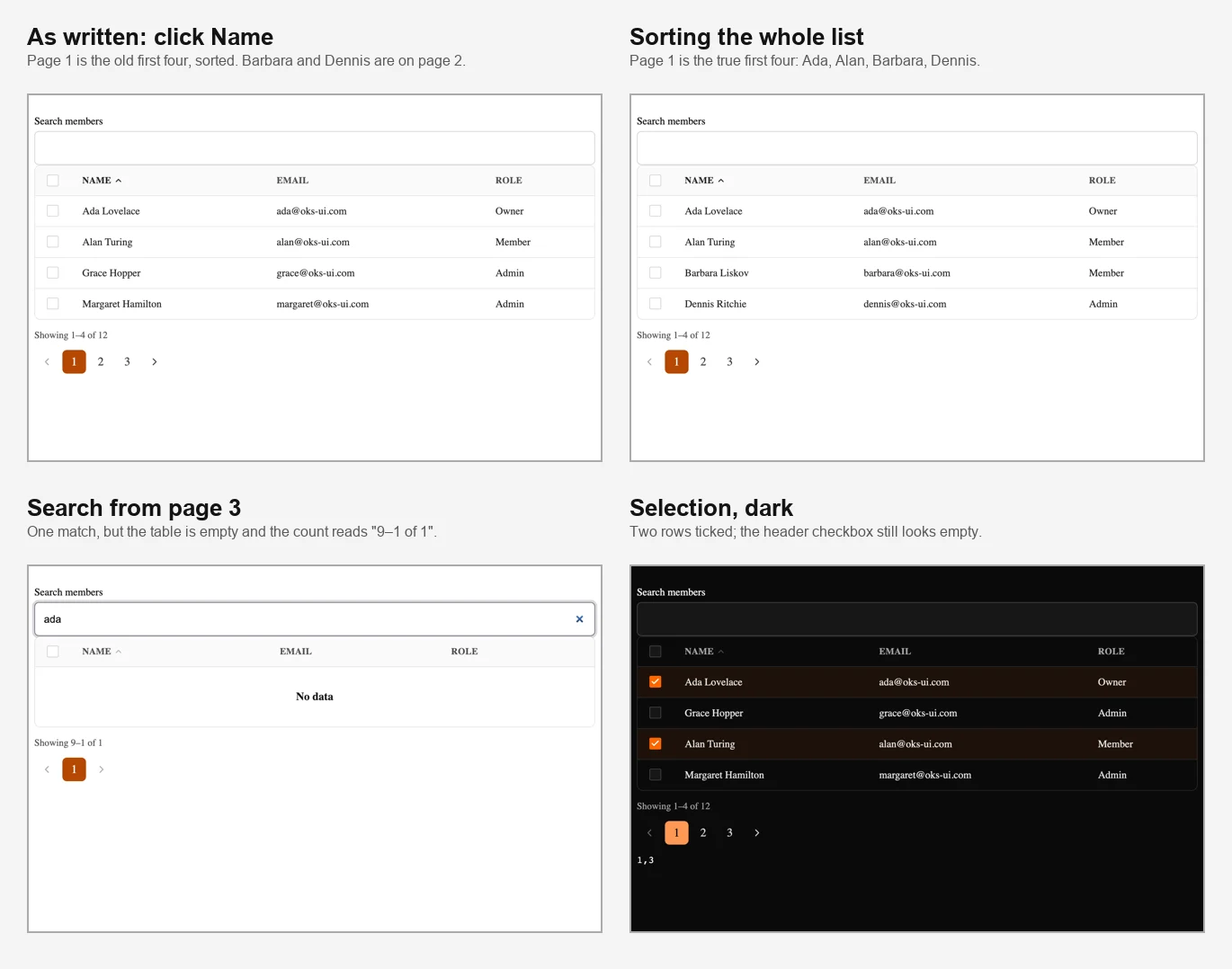
The table in four states. The two on the left show the same click, before and after the fix.
Table takes rows as plain objects and a getRowKey function, with no adapter layer and no special row type.
type Row = { id: number; name: string; email: string; role: string };

const DATA: Row[] = [
  { id: 1, name: "Ada Lovelace", email: "ada@oks-ui.com", role: "Owner" },
  { id: 2, name: "Grace Hopper", email: "grace@oks-ui.com", role: "Admin" },
  { id: 3, name: "Alan Turing", email: "alan@oks-ui.com", role: "Member" },
  // ...
];
I used twelve rows with four per page, so there are three pages.
Table itself has no search box. It renders whatever rows you give it. Filtering lives in your own state, one useMemo, and the search box is a FormFieldSet of type search, which the first version mentioned but never showed:
const [query, setQuery] = useState("");
const [page, setPage] = useState(1);

const filtered = useMemo(
  () => DATA.filter((r) => r.name.toLowerCase().includes(query.toLowerCase())),
  [query],
);

<FormFieldSet
  type="search"
  name="q"
  label="Search members"
  value={query}
  onChange={(v: unknown) => {
    setQuery(String(v ?? ""));
    setPage(1); // new in this version: go back to the first page
  }}
/>
The filter works on the name only: typing "ADA" found Ada Lovelace, and typing the email domain found nothing. The setPage(1) line is the fix for the first version's bug. Without it, if you were on page 3 and typed "ada", the table showed no rows at all, because page 3 of a one-row result does not exist, and the count under it read "Showing 9–1 of 1". That is the third screenshot above. Any change to the filter must put the person back on page 1.
Pass sortable: true on a column and Table handles the click-to-sort interface. The first version said that if you leave out onSortChange, it sorts client-side automatically. That is true, but it sorts only the rows it is given, and in this example it is given one page of them. I clicked "Name" and the first page showed Ada, Alan, Grace and Margaret in order, while Barbara and Dennis, who come before Grace alphabetically, were on page 2. The sort only reordered the four rows on screen.
To sort the whole list, take control: keep the sort in state, sort filtered yourself before slicing out the page, and pass the descriptor to the table:
const [sort, setSort] = useState<TableSortDescriptor | null>(null);

const sorted = useMemo(() => {
  if (!sort) return filtered;
  const dir = sort.direction === "ascending" ? 1 : -1;
  return [...filtered].sort(
    (a, b) => String(a[sort.column as keyof Row]).localeCompare(String(b[sort.column as keyof Row])) * dir,
  );
}, [filtered, sort]);

const PAGE_SIZE = 4;
const pageRows = sorted.slice((page - 1) * PAGE_SIZE, page * PAGE_SIZE);

const [selected, setSelected] = useState<Set<number>>(new Set());

<Table
  aria-label="Team members"
  columns={[
    { key: "name", header: "Name", sortable: true },
    { key: "email", header: "Email" },
    { key: "role", header: "Role" },
  ]}
  rows={pageRows}
  getRowKey={(r) => r.id}
  sortDescriptor={sort}
  onSortChange={(next) => {
    setSort(next);
    setPage(1);
  }}
  selectionMode="multiple"
  selectedKeys={selected}
  onSelectionChange={(keys) => setSelected(keys as Set<number>)}
/>
With this, clicking "Name" on page 2 went to page 1 and showed Ada, Alan, Barbara and Dennis, the true first four, and page 3 held the rest in order. This is the same server-mode contract as in the server-side sorting post; here the "server" is your own useMemo.
selectionMode="multiple" plus selectedKeys and onSelectionChange gives you a checkbox on every row and one in the header. What I saw:
getRowKey returns a stable id.onSelectionChange hands you a set of keys that may be strings or numbers, so with numeric ids you cast it, as above.Two accessibility details. With some rows selected, the header checkbox's indeterminate property was set, which is what a screen reader reads, but the box is drawn the same as an unticked one: there is no dash on screen. And every row checkbox has the same accessible name, "Select row", so a screen reader user hears "Select row" over and over without knowing which row it belongs to. Pressing Space on a focused checkbox selects the row, as expected.
Table "throws in development if you skip it". It does not. I rendered a Table without aria-label in a development build and in a production build, in all three browsers: it rendered silently both times, with no error and no console warning. The TypeScript type is the only thing that makes you add it, so do add it: a table with no accessible name is hard to use with a screen reader.Pagination and PaginationSummary are told the current page, the page count and the total. They do not know that the data came from a search filter:
<PaginationSummary page={page} pageSize={PAGE_SIZE} total={filtered.length} />
<Pagination
  page={page}
  pageCount={Math.max(1, Math.ceil(filtered.length / PAGE_SIZE))}
  onChange={setPage}
/>
With the twelve rows this printed "Showing 1–4 of 12" and three page buttons. Note total is the filtered count, not the full data set.
Three props round out the states a real table needs:
isLoading swaps in skeleton rows. It showed 20 skeleton cells for the default five rows of three columns plus the checkbox column.emptyContent replaces the body when rows is empty. The default is the single line "No data", so replace it with something more helpful, such as "No members match your search" and a button to clear it. With the empty default, the line under the table still said "Showing 0–0 of 0".renderExpandedRow adds a chevron button in its own column. Its label is "Expand row" and then "Collapse row", it sets aria-expanded, and Enter toggles it. My details panel appeared under the right row.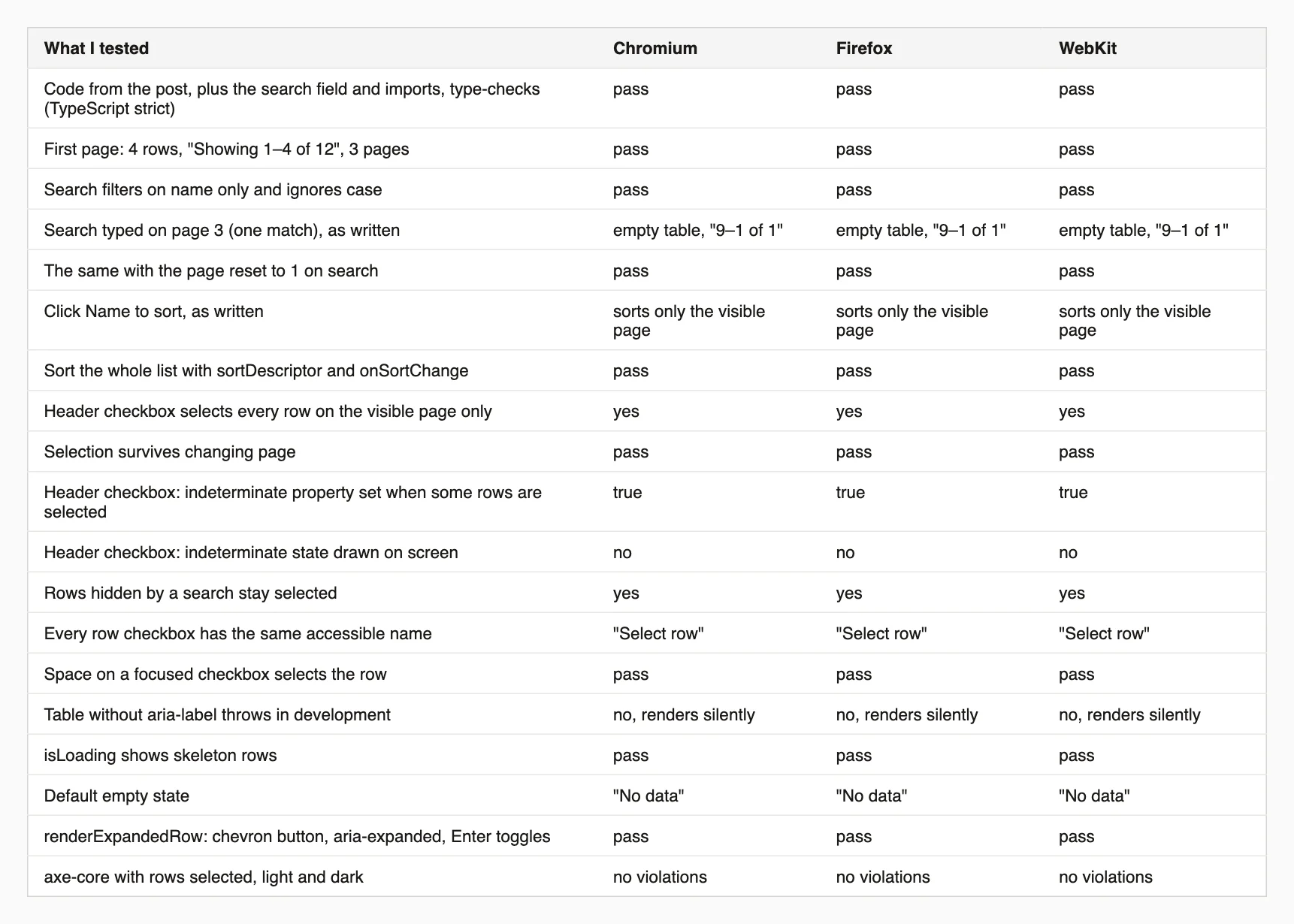
Every result, in all three browsers.
On size: the whole page, React included, came to 114 KB of JavaScript and 36 KB of CSS gzipped.
This script clicks a column's sort button, walks through every page of your table and tells you whether the values, read page after page, are in order. A sort that only reorders one page fails it. Install playwright first.
// npm i -D playwright
// node check-sort-across-pages.mjs http://localhost:3000/team "Name" 1
// Arguments: the page address, the text of the sort button, and the column number (the first column is 0).
import { chromium, firefox, webkit } from "playwright";

const [url, header, columnIndex = "0"] = process.argv.slice(2);

for (const [name, type] of [["Chromium", chromium], ["Firefox", firefox], ["WebKit", webkit]]) {
  const browser = await type.launch();
  const page = await (await browser.newContext({ viewport: { width: 900, height: 800 } })).newPage();
  await page.goto(url);
  await page.locator("th button", { hasText: header }).first().click();
  await page.waitForTimeout(300);
  const values = [];
  for (let guard = 0; guard < 200; guard++) {
    values.push(...(await page.evaluate((i) => [...document.querySelectorAll("tbody tr")].map((row) => row.querySelectorAll("td")[i]?.textContent.trim()).filter(Boolean), Number(columnIndex))));
    const next = page.getByRole("button", { name: /next page/i });
    if (!(await next.count()) || (await next.first().isDisabled())) break;
    await next.first().click();
    await page.waitForTimeout(200);
  }
  const sorted = values.every((v, i) => i === 0 || values[i - 1].localeCompare(v) <= 0);
  console.log(`${name}: ${values.length} values over all pages, ${sorted ? "in order" : "NOT in order (the sort only reorders one page)"}`);
  await browser.close();
}
On the first version's code it printed "12 values over all pages, NOT in order" in all three browsers, and on the fixed code "in order".
Full prop reference at the Table component page, and this exact example, with search, sort, select and pagination wired end to end, as a live preview with the complete source at the data table pattern.
localeCompare. Real data may need your own comparison.I'm a front-end engineer based in Hyderabad, India, with more than 17 years of professional experience. I spent 12 years as a senior front-end developer, designing and building websites, and I have worked as a full-stack developer since 2022. I created oks-ui, a React component library with no runtime dependencies, and I write and maintain this site.