 oks-ui
Omkar Sahu · 8 min read
Published · Updated · Last reviewed · by Omkar Sahu

Most React kanban boards reach for a drag-and-drop library the moment cards need to move between columns, and inherit that library's size and its own accessibility gaps. oks-ui's Board does mouse, touch and keyboard drag-and-drop with no dependencies. This post shows how each path works and what I saw when I tried to break them.
Board does not want your data grouped into columns. It takes one flat items array and a getItemColumn function, and groups them when it renders. Moving a card between columns is then just a change to what getItemColumn returns for it, in your own state:
<Board
  aria-label="Sprint board"
  columns={[
    { id: "todo", title: "To do" },
    { id: "doing", title: "In progress", limit: 3 },
    { id: "done", title: "Done" },
  ]}
  items={items}
  getItemId={(item) => item.id}
  getItemColumn={(item) => item.columnId}
  renderCard={(item) => <Card>{item.title}</Card>}
  onItemMove={({ item, to }) => {
    setItems((prev) =>
      prev.map((i) => (i.id === item.id ? { ...i, columnId: to.columnId } : i)),
    );
  }}
/>
Every drag ends at the same onItemMove callback, with an object holding item, itemId, from and to. I checked this by dragging with the mouse and moving with the keyboard on the same board: in all three browsers the callback fired once, with the same four keys, and from and to each holding a columnId and an index.
The published oks-ui 1.4.1 package lists no dependencies, only react and react-dom as peers. I bundled oks-ui/board on its own with esbuild and looked at what it imports: only react and react/jsx-runtime. The Board code comes to 6.9 KB minified, 2.9 KB gzipped, and its stylesheet is 1.35 KB gzipped.
This is the part most drag-and-drop code leaves out. These are the results from a real keyboard in all three browsers:
aria-pressed="true".limit reached) or have isDropDisabled are skipped. On my test board, lifting a card from "To do" and pressing the right arrow went straight to "Done", past a full column and a disabled one.onItemMove once. Focus stays on the card.aria-pressed goes away and focus stays on the card.The first version of this post quoted "moved to In progress, position 2 of 3". That is not what Board says. Board has a visually hidden role="status" region with aria-live="polite", and these are the exact messages I recorded:
Note what is missing: the drop message does not say where the card went. A screen-reader user hears the target on each arrow press, then only "Card dropped" at the end. I have not listened to this with a screen reader, so I cannot say how it sounds in practice; I only know what text is placed in the region.
While a card is lifted with the keyboard, it does not move on screen and no insertion line appears. The only visible change is the focus ring on the card. The position exists in the announcements until you press Space. For a sighted keyboard user that is a real gap. I checked it in Chromium and WebKit.
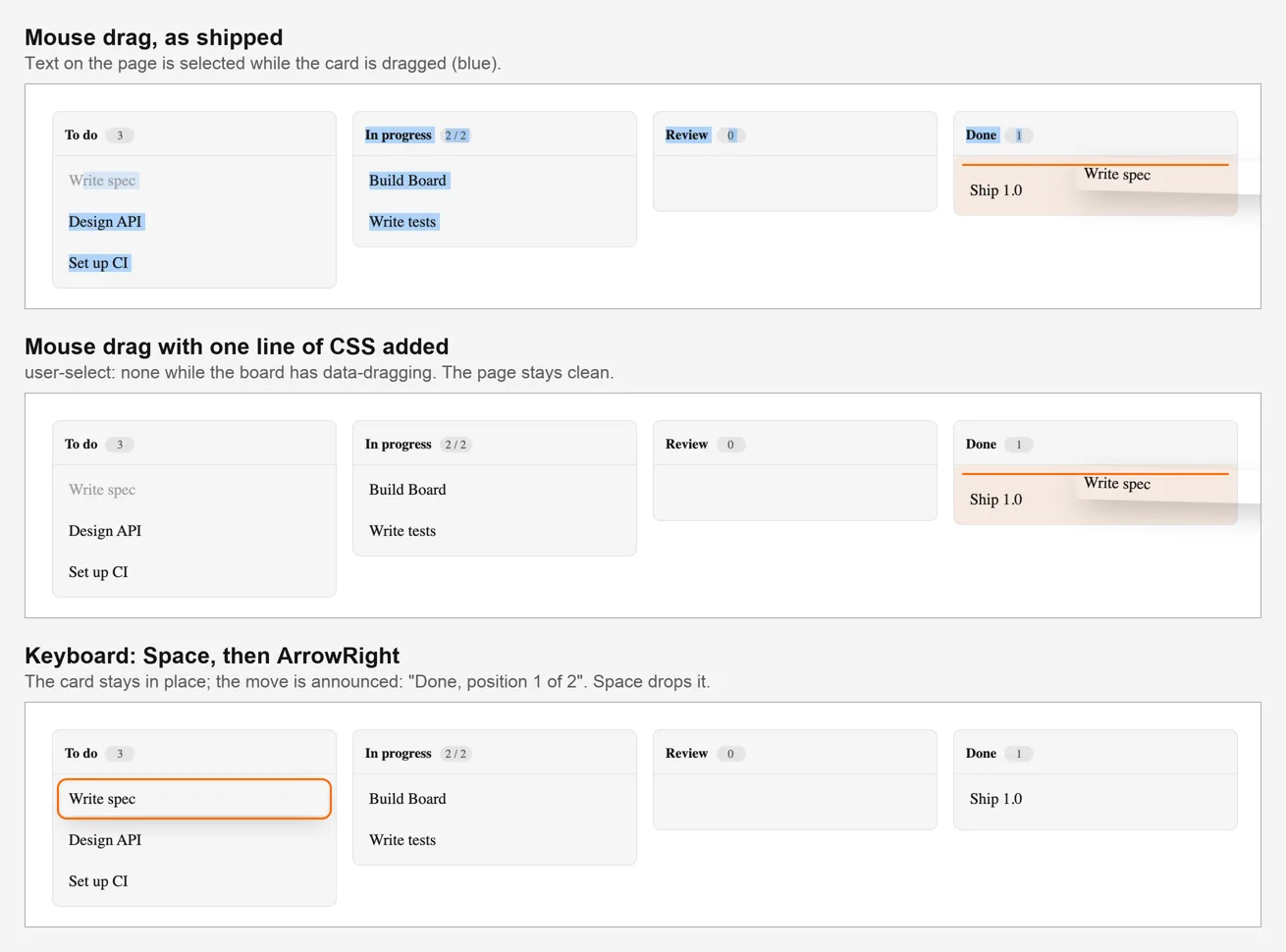
Top: a mouse drag as shipped. Middle: the same drag with one line of CSS. Bottom: a card lifted with Space and moved right with the arrow key.
One more thing I noticed: pressing Tab while a card is lifted moves focus away, but the card stays lifted. Nothing cancels it, so a keyboard user can leave a board with a card still in the lifted state.
With the mouse, dragging shows a floating copy of the card under the pointer and an insertion line where it will land. Both appeared in all three browsers, and dropping fired the same callback as the keyboard. Dropping on a full column or a drop-disabled column did nothing, in all three. A click that moved only 2 pixels did not start a drag.
For touch, a card needs to be held for 180 ms before it can be dragged. I checked this with simulated touch events in all three browsers: a quick swipe did not drag, and a 400 ms hold followed by a move did. Simulated events are not real fingers, so I also sent real touch events to Chromium through the DevTools protocol. Holding and then dragging sideways moved a card across columns. Holding and then dragging straight down did not: the browser took the gesture over to scroll and cancelled the drag, so a card could not be reordered inside its column by touch. The cards use touch-action: pan-y, which lets the browser claim vertical gestures. I did not test Firefox or Safari with real touch events, and I did not use a physical phone.
In all three browsers, dragging a card with the mouse selected the text of the other cards and the column headers, as the top screenshot shows. Board does not set user-select: none. Adding one rule fixed it in all three browsers:
.oksBoard[data-dragging="true"] {
  -webkit-user-select: none;
  user-select: none;
}
I tested this rule on my page. It relies on the data-dragging attribute that Board puts on its root while a drag is in progress. This is a gap in oks-ui 1.4.1 and I have noted it for the library.
Dragging near the left or right edge of the board scrolls it sideways by 12 pixels for each pointer movement. In Chromium it kept scrolling when I held the pointer still at the edge. In Firefox and WebKit it stopped as soon as the pointer stopped, so the user has to keep wiggling the mouse. It scrolls horizontally only.
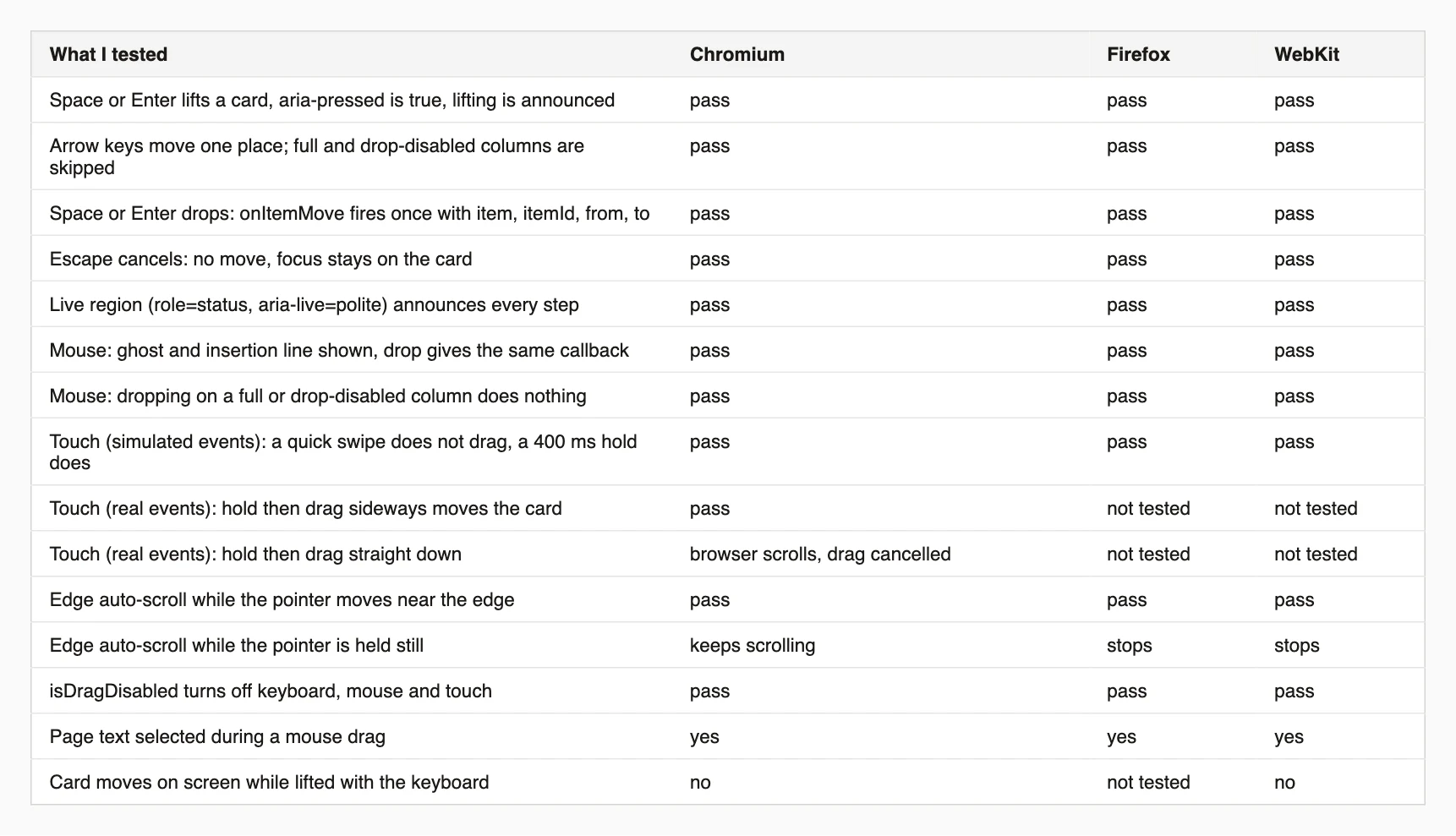
Every result. "Not tested" means I did not run that case in that browser.
This script runs the main keyboard checks against a page with a Board, in each browser. It looks for the data-board-card attribute that Board puts on each card. Install playwright and its browsers first.
// node board-keyboard-check.mjs http://localhost:3000/your-board
import { chromium, firefox, webkit } from "playwright";

const url = process.argv[2];
const text = (page) => page.evaluate(() => document.querySelector('[role="status"]')?.textContent ?? "");

for (const [name, type] of [["Chromium", chromium], ["Firefox", firefox], ["WebKit", webkit]]) {
  const browser = await type.launch();
  const page = await browser.newPage();
  await page.goto(url);
  const card = page.locator("[data-board-card]").first();
  const id = await card.getAttribute("data-board-card");
  const checks = [];

  await card.focus();
  await page.keyboard.press("Space");
  checks.push(["Space lifts the card", (await card.getAttribute("aria-pressed")) === "true"]);
  checks.push(["lifting is announced", /^Lifted card/.test(await text(page))]);

  await page.keyboard.press("ArrowDown");
  checks.push(["an arrow key is announced", /position \d+ of \d+/.test(await text(page))]);

  await page.keyboard.press("Escape");
  checks.push(["Escape cancels", (await card.getAttribute("aria-pressed")) === null && (await text(page)) === "Move cancelled."]);
  checks.push(["focus stays on the card", await page.evaluate((i) => document.activeElement?.getAttribute("data-board-card") === i, id)]);

  console.log(`${name}: ${checks.map(([n, ok]) => `${ok ? "pass" : "FAIL"} ${n}`).join("; ")}`);
  await browser.close();
}
On my test board it printed five passes for each browser.
A general drag-and-drop library has to handle lists, grids, trees and free-form canvases, so its keyboard and screen-reader support has to be general too. Board only has to handle cards in columns, and that narrower job is what made it possible to write the whole keyboard path by hand. The tests above are my evidence that it works. They are also my evidence for where it does not yet: the visible keyboard preview, text selection, touch reordering inside a column, and the drop announcement. See the full props on the Board component page.
I'm a front-end engineer based in Hyderabad, India, with more than 17 years of professional experience. I spent 12 years as a senior front-end developer, designing and building websites, and I have worked as a full-stack developer since 2022. I created oks-ui, a React component library with no runtime dependencies, and I write and maintain this site.