 oks-ui
Omkar Sahu · 6 min read
Published · Updated · Last reviewed · by Omkar Sahu
oks-ui 1.2 is available on npm. It is a big release for bundle size, accessibility and the TextEditor. Nothing was removed, so upgrading is safe. I checked that last sentence too: all 463 names that oks-ui 1.1.2 exports are still exported by 1.2.0, and 1.2.0 adds two.
npm install oks-ui@^1.2.0Every component can now be imported on its own, with its own stylesheet, so your app ships only what it uses:
import { Button } from "oks-ui/button";
import "oks-ui/button.css";
36 components have their own entry point. Each stylesheet includes the styles of the components it renders. The oks-ui barrel and oks-ui/styles.css keep working as before.
Why. In 1.1.2 there was one way in: the barrel and one stylesheet with everything in it. I built the smallest possible app, one Button, against 1.1.2 and measured it with esbuild, gzipped:
With 1.2.0 the same app costs:
An app with a Button, a Modal and a Table went from 79.8 KB of JavaScript and 43.3 KB of CSS in 1.1.2 to 41.3 KB and 18.6 KB in 1.2.0. The package's entry points went from 9 to 81.
One detail the release note did not make clear: in 1.2.0 the JavaScript saving does not depend on how you import. A one-button app that still used the barrel and oks-ui/styles.css came to 5.7 KB of JavaScript as well, because the bundler can now drop what you do not use. It is the CSS that needs the per-component paths: that same barrel app still shipped 44.4 KB of CSS. The bundle-size post measures this in more detail on later versions.
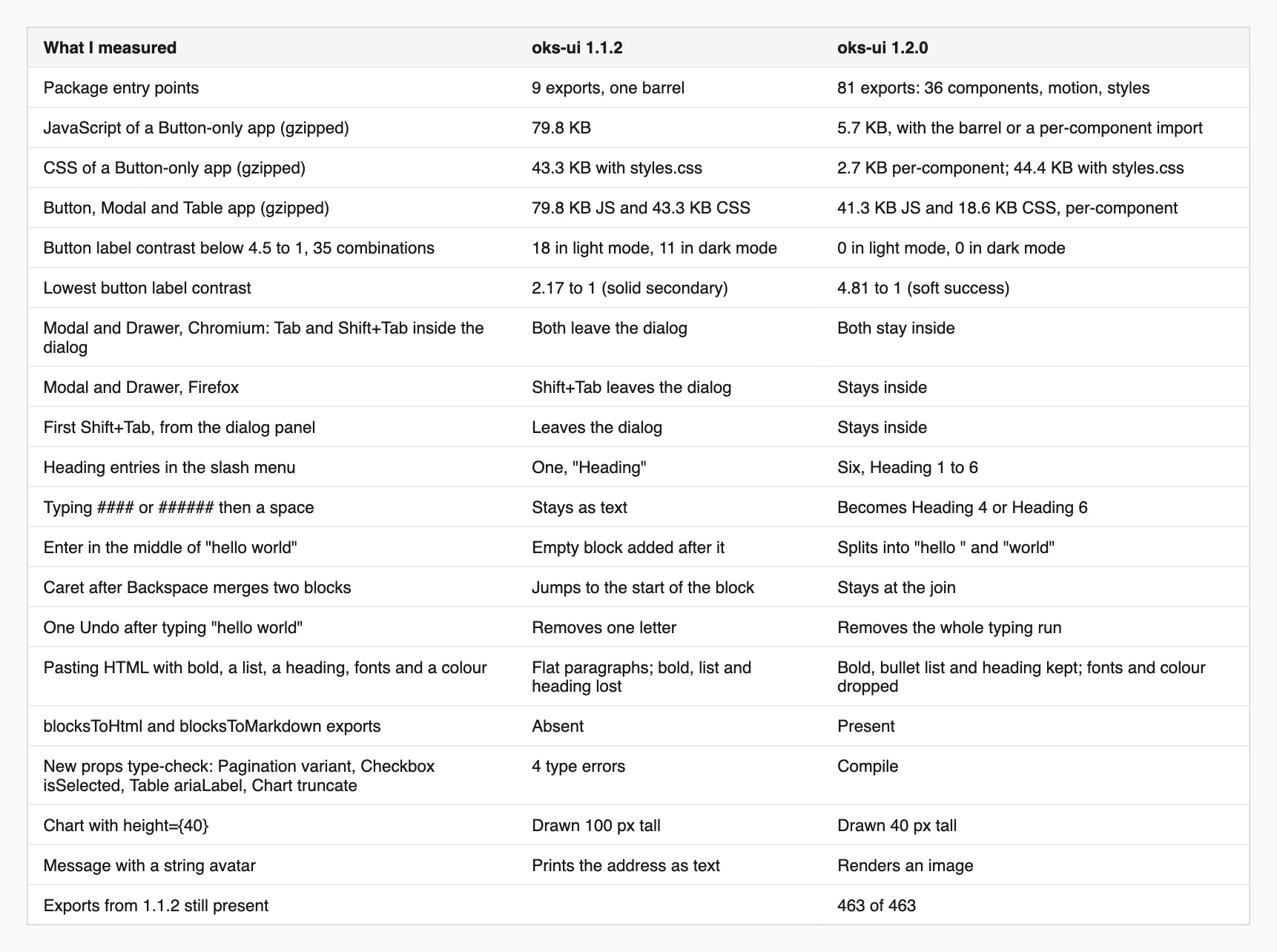
Every measurement in this post, 1.1.2 next to 1.2.0.
Text on a colour, and text in a colour, now meets the 4.5:1 contrast ratio in both themes:
--oks-color-fg-muted token covers secondary text such as captions and table headers.Brand colours themselves are unchanged and stay on decorative uses like dots and tints.
Why. The changelog gives the cause: the 500 shade of each colour is the anchor of its ramp and is the same hex in light and dark mode, so white text on 500, and 500-coloured text on white, failed for most colours. I measured it on the Button in all five variants and seven colours, in both themes, 35 combinations each:
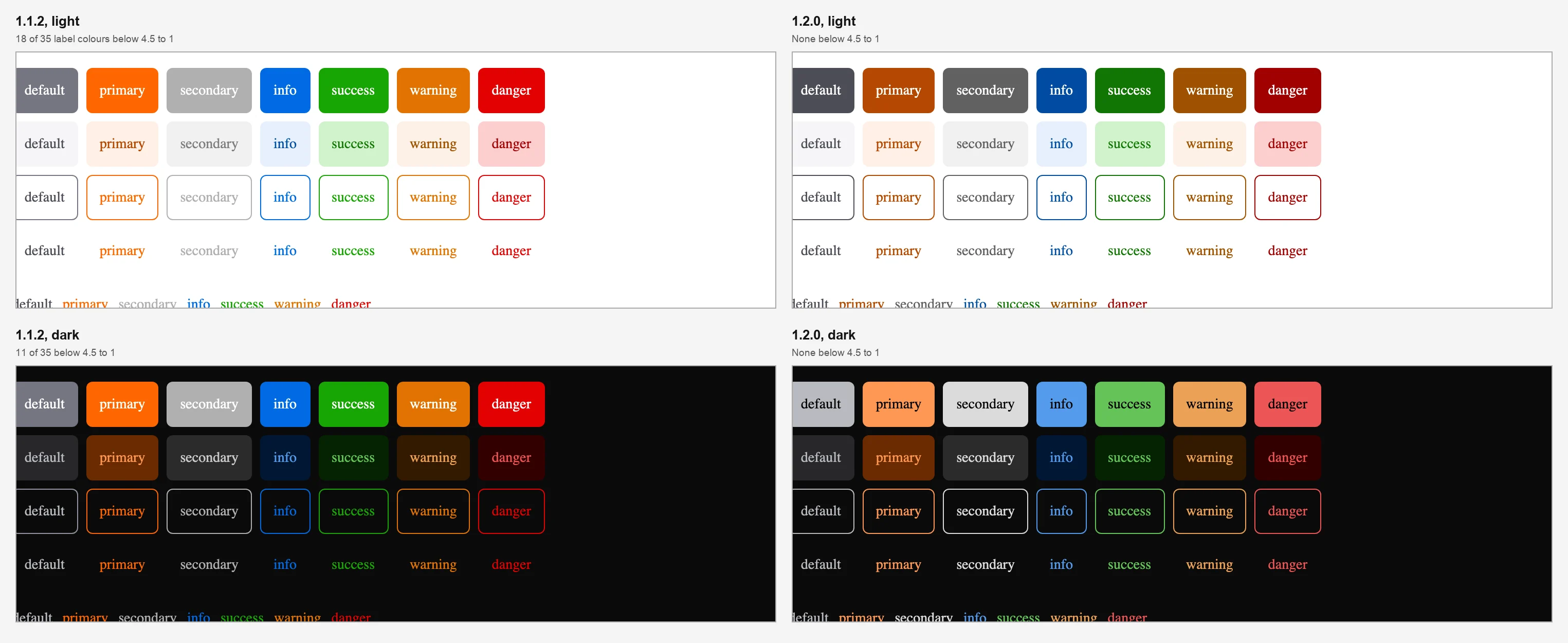
The same buttons in 1.1.2 and 1.2.0. In 1.1.2 the pale secondary button and the bright orange and green ones are the hard ones to read. In 1.2.0 the fills are visibly deeper in light mode, and lighter with dark labels in dark mode.
This was the resting state. In later versions I found a few soft-variant buttons that dip below 4.5 to 1 while hovered or pressed; the Button guide has the details. For --oks-color-fg-muted, the changelog says secondary text in dark mode went from 3.9 to 1 to 7.3 to 1. I did not re-measure that one.
Modal and Drawer now trap Tab and Shift+Tab reliably. The trap used to miss the most common pattern, mounting the dialog closed and opening it later, and Shift+Tab could escape from the dialog panel.
Why. A dialog that lets focus escape defeats its purpose: a keyboard user ends up on the page behind it, which is covered by the backdrop. I reproduced it with the common pattern, a Modal and a Drawer that are always rendered and shown by a button, opened with the keyboard, then pressing Tab or Shift+Tab eight times:
Modal and Drawer.I did not test WebKit here, because Safari skips buttons with Tab by default and the check would not be meaningful. The accessible modal post covers the current behaviour in all three engines.
The block editor got the biggest update:
# to ###### shortcuts.blocksToHtml and blocksToMarkdown render saved content outside the editor.Why. The editor is the part of oks-ui where small differences from what people expect are most obvious, because people type into it. I ran the same keystrokes against the editor in 1.1.2 and 1.2.0 in Chromium:
#### or ###### and a space left plain text in 1.1.2 and made Heading 4 and Heading 6 in 1.2.0.blocksToHtml and blocksToMarkdown do not exist in 1.1.2.I did not confirm the Tab-to-indent line: in my test, Tab on a second list item left the list flat in both versions, so treat that bullet as unverified.
Pagination accepts variant, color and radius, like Button and Chip.Checkbox accepts isSelected, defaultSelected and onSelectedChange, matching Chip.Chart can shorten long category labels with axisX.truncate and set its title level with titleAs.Table columns take an ariaLabel for icon-only columns.Nav has a --oks-nav-active-indicator token for an accent bar on the active link.Why. The changelog's reasons are about consistency: one vocabulary across components, so a form that mixes Checkbox and Chip does not need two ways to say "selected", and an icon-only table column has a name for a screen reader. I checked that the new props are really new by compiling a file that uses them. Against 1.1.2, TypeScript reported errors for Pagination variant, Checkbox isSelected, Table ariaLabel, Chart axisX.truncate and the missing blocksToHtml and blocksToMarkdown. Against 1.2.0 it compiled, once I passed truncate a boolean: it is true or false, not a number of characters. I did not test the Nav token.
Table no longer widens the page on phones.Chart (height={40}) renders at its real height instead of a 100 px minimum.Checkbox no longer stretches across its row.Message renders a string avatar as an image.Nav, Avatar, Calendar, DatePickerField, SplitLayout and Chart.Why, and what I could reproduce.
height={40} was drawn 100 pixels tall; in 1.2.0 it was 40. Confirmed.avatar printed its address as text next to the name; in 1.2.0 it rendered an image. Confirmed.Table in a plain page did not widen a 375 pixel wide page in 1.1.2 or in 1.2.0. In a flex or grid parent, the page widened in every version I tried, including 1.4.1, because such a parent will not shrink below the table's width. Putting min-width: 0 on the element that wraps the table kept the page at 375 pixels, with the table scrolling inside it. So if you still see the page widen, that is the first thing to try.Install 1.2 and everything keeps working. For the bundle-size win, move imports to the per-component paths when convenient: the installation guide shows both styles. If you have colours pinned to work around the old contrast, you can remove the workarounds, and expect solid buttons and chips to look deeper in light mode.
Button at rest, not for every component the release touched.I'm a front-end engineer based in Hyderabad, India, with more than 17 years of professional experience. I spent 12 years as a senior front-end developer, designing and building websites, and I have worked as a full-stack developer since 2022. I created oks-ui, a React component library with no runtime dependencies, and I write and maintain this site.