 oks-ui
Omkar Sahu · 9 min read
Published · Updated · Last reviewed · by Omkar Sahu
oks-ui is a React component library written in strict TypeScript, styled with CSS variables, with no runtime dependencies besides React. This guide takes you from an empty React app to a themed page with working components. The commands themselves took me about 18 seconds on a fast connection (2 seconds to scaffold a Vite app, 14 to install, 2 to build); the rest of the five minutes is you typing the code.
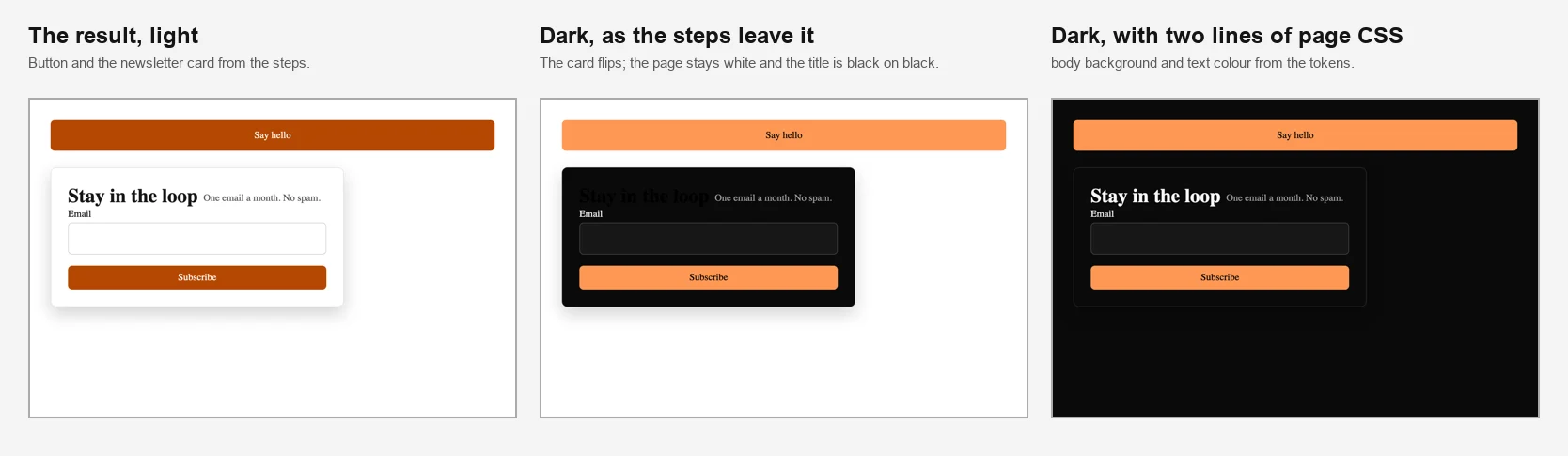
The result of the steps. Left: light. Middle: dark, as the first version left it. Right: dark, with the fix from Step 5.
oks-ui works with React 18 or newer, in any bundler. No build plugin is needed.
npm install oks-uiThe package declares react and react-dom 18 or newer as peer dependencies and has no other dependencies. I installed it into a fresh Vite 8 app with React 19 and TypeScript 6, into a Vite 7 app with React 18.3 and TypeScript 5.9, and into a Next.js 16.4 app. All three built, and the React 18 app rendered the Step 3 and Step 4 components with no console errors or warnings.
Colours, spacing, radii and type sizes are CSS custom properties. Import them once at the root of your app:
@import "oks-ui/tokens.css";
@import "oks-ui/utilities.css";
These lines must be the very first thing in the file. CSS only allows @import before every other rule. A fresh Vite app's src/index.css starts with a :root block, so if you paste the two lines under it, Vite prints a warning, drops them, and carries on. I tried it: the build was still green, but the tokens, the dark-mode values and the utility classes were all missing, and the CSS shrank from 193 KB to 141 KB. Put the lines at the top of the file, or import the files from JavaScript instead, which has no ordering rule:
// src/main.tsx
import "oks-ui/tokens.css";
import "oks-ui/utilities.css"; // optional
import "./index.css";
Both ways gave an identical build. utilities.css adds a small set of spacing and radius helper classes like oks-p-4 and oks-mt-2. It is optional; oks-p-4 gave 16 pixels of padding when I tried it.
If the colours in your app look wrong, such as buttons in a flat default blue, the tokens are probably missing. This script reads your built CSS and tells you:
// node check-tokens-in-build.mjs dist
import { readdirSync, readFileSync, statSync } from "node:fs";
import { join } from "node:path";

const root = process.argv[2] ?? "dist";
const files = [];
(function walk(dir) {
  for (const name of readdirSync(dir)) {
    const path = join(dir, name);
    if (statSync(path).isDirectory()) walk(path);
    else if (name.endsWith(".css")) files.push(path);
  }
})(root);

const css = files.map((f) => readFileSync(f, "utf8")).join("\n");
const has = (text) => css.includes(text);
console.log(`${files.length} CSS file(s), ${(css.length / 1024).toFixed(0)} KB`);
console.log(`design tokens (--oks-palette-primary-700): ${has("--oks-palette-primary-700:") ? "present" : "MISSING"}`);
console.log(`dark theme values (data-theme="dark"):     ${has('data-theme="dark"') || has("data-theme=dark") ? "present" : "MISSING"}`);
console.log(`utilities (.oks-p-4):                      ${has(".oks-p-4") ? "present" : "not included (fine if you did not import utilities.css)"}`);
On the build with the lines at the top it printed "present" three times. On the build with them at the bottom it printed "MISSING" for the tokens and the dark values.
Import each component from its own entry point, with its stylesheet:
import { Button } from "oks-ui/button";
import "oks-ui/button.css";

export const App = () => {
  return (
    <Button color="primary" onPress={() => alert("Hello!")}>
      Say hello
    </Button>
  );
};
This worked in all three browsers: the button rendered in the brand orange, and clicking it showed "Hello!". Per-component imports mean your app only ships the components it uses. You can also import everything from oks-ui and load oks-ui/styles.css, which is simpler. In my Vite app it made no difference to the JavaScript (107.6 KB gzipped against 107.5), because the bundler drops what you do not use, but the CSS roughly doubled, from 24.5 KB to 48.0 KB gzipped. The bundle-size post has the full measurements. Do not do it in a Next.js Server Component: see the Next.js section.
A card with a title, a form field and a button. The first version left out the useState import, so this did not compile in a TypeScript project ("Cannot find name 'useState'"). Here it is with the import:
import { useState } from "react";
import { Card } from "oks-ui/card";
import "oks-ui/card.css";
import { PageTitle } from "oks-ui/page-title";
import "oks-ui/page-title.css";
import { FormFieldSet } from "oks-ui/form-field-set";
import "oks-ui/form-field-set.css";
import { Button } from "oks-ui/button";
import "oks-ui/button.css";

export const Newsletter = () => {
  const [email, setEmail] = useState("");
  return (
    <Card shadow="md" radius="lg" style={{ padding: 24, maxWidth: 420 }}>
      <PageTitle as="h2" title="Stay in the loop" subtitle="One email a month. No spam." />
      <FormFieldSet
        type="email"
        name="email"
        label="Email"
        value={email}
        onChange={(v) => setEmail(String(v ?? ""))}
      />
      <Button color="primary" fullWidth style={{ marginTop: 16 }}>
        Subscribe
      </Button>
    </Card>
  );
};
With the import added it compiled in strict mode, and the card, the title and the email field rendered with no console errors in all three browsers. Form fields emit their value directly: onChange receives the new value, not a browser event.
Set data-theme="dark" on the html element and the oks-ui components switch:
document.documentElement.setAttribute("data-theme", "dark");There is no theme provider to wrap your app in. But the first version said "every component switches", and that is not the whole picture. oks-ui themes its own components, not your page. After setting the attribute, the card went dark, but the page behind it stayed white, and the title inside the card stayed black, because PageTitle takes its colour from the page. That is black text on a near-black card: axe-core reported a contrast failure of 1.01 to 1, in all three browsers. The middle picture above shows it.
Two lines of your own CSS fix it, using the tokens, so the page follows the theme too:
body {
  background: var(--oks-color-surface);
  color: var(--oks-color-neutral-900);
}
With that, everything was dark and readable and axe-core found no failures, in all three browsers. The theming post goes further into the tokens.
To avoid a flash of the light theme on page load, set the attribute in a small script in the document head before the page paints. Use a plain inline <script>: a framework wrapper such as next/script may run after the first paint in a static export. The dark mode post has the tested snippet and the numbers, and the dark mode guide covers the rest.
Every colour comes from CSS variables, so theming is overriding a few of them. The brand theming guide walks through the primary colour ramp, corner radius and density. Before you copy a short ramp from anywhere, read the theming post: a solid button reads more shades of the primary colour than you would expect, and it also explains how to get dark mode right.
I tested this on Next.js 16.4 with the App Router. The first version said to add "use client" to files that render oks-ui components. That is more than you need:
Button and no "use client" built, and the button was in the prerendered HTML.onPress={() => alert("Hello!")} failed the build with "Event handlers cannot be passed to Client Component props". The Step 4 Newsletter, which uses useState, failed with "You're importing a module that depends on useState into a React Server Component". With "use client" at the top of that file it built, and the form was in the prerendered HTML.import "oks-ui/button.css", the Turbopack build contained no button CSS at all. The webpack build included it anyway, so code that works under webpack can break when you switch. The explicit line works under both.The Next.js page of the docs has the same guidance.
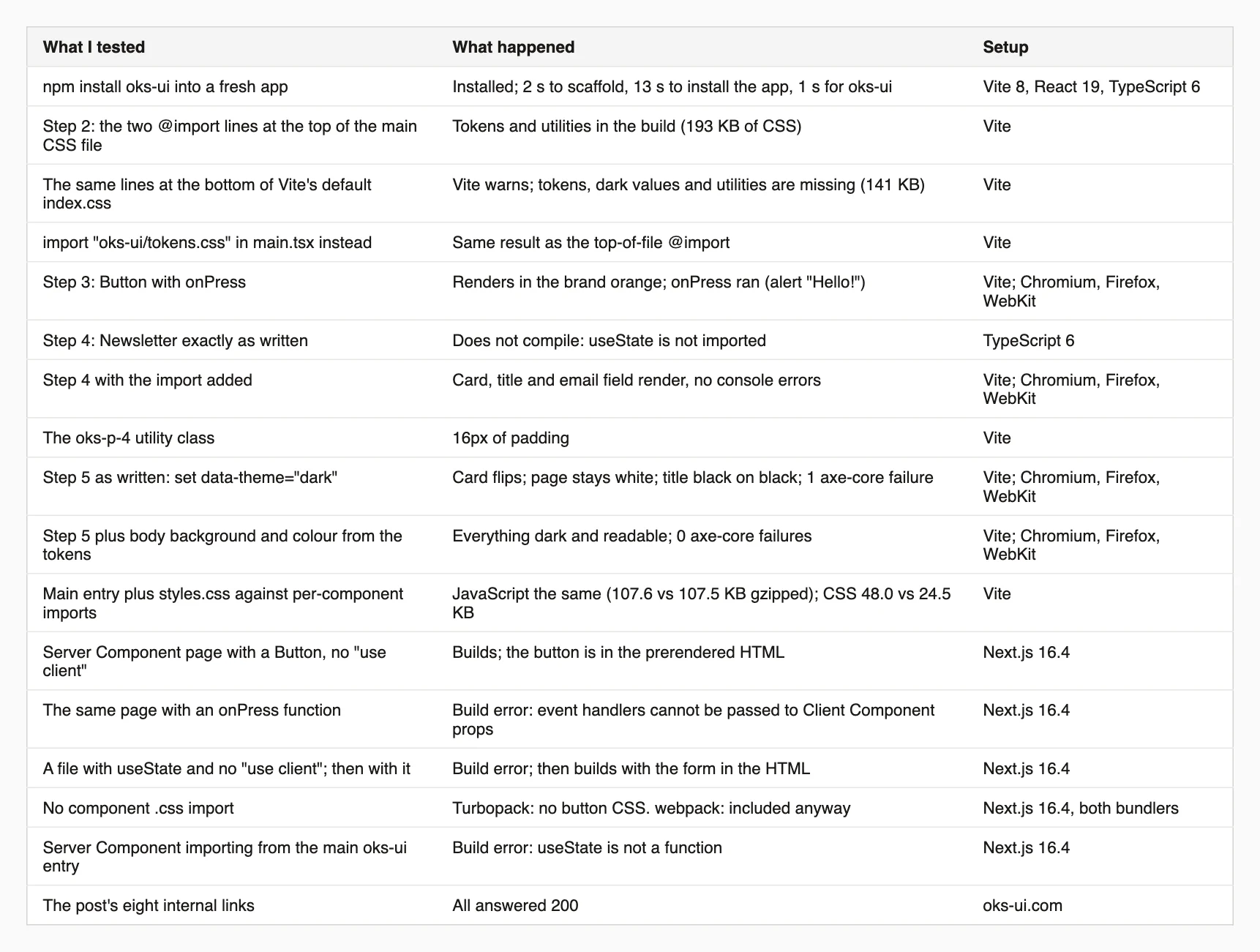
Every result. The Step 3 to 5 checks ran in Chromium, Firefox and WebKit; the build results are from Vite and Next.js.
I'm a front-end engineer based in Hyderabad, India, with more than 17 years of professional experience. I spent 12 years as a senior front-end developer, designing and building websites, and I have worked as a full-stack developer since 2022. I created oks-ui, a React component library with no runtime dependencies, and I write and maintain this site.